
Screenshots
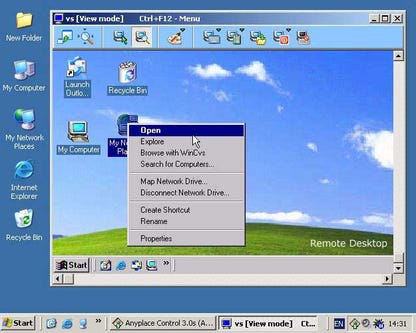


App details
- Updated
- July 25, 2013
- Requires
- Windows 2003, Windows Vista, Windows, Wi...
- Developer
- TightVNC Software
- Category
- Mobile
SoftPas in:
This product is also available in the following languages:
About TightVNC (32 bit)
Download TightVNC (32 bit) – remote control, VNC, remote desktop, desktop sharing, remote access
Overview
TightVNC (32 bit) is a remote control application designed for users who require reliable and efficient access to remote systems. Built on the VNC (Virtual Network Computing) protocol, this tool enables users to view and interact with another computer’s desktop environment as if they were sitting in front of it. The application is particularly useful in scenarios involving remote administration, technical support, collaborative work, or accessing home or office computers from a different location. Its optimized performance on slow network connections makes it a valuable utility for users in low-bandwidth environments, such as those relying on older internet connections or dial-up modems. The software is tailored for Windows-based systems and supports a range of remote access needs across personal and professional contexts. The developer, TightVNC Software, has focused on enhancing the original VNC protocol with performance improvements, bug fixes, and additional configuration flexibility. While specific background details about the development team are not publicly disclosed, the consistent updates and feature enhancements suggest a dedicated effort to maintain compatibility and usability. TightVNC (32 bit) fits into the broader ecosystem of remote access tools by offering a lightweight, open-architecture solution that integrates well with existing VNC-based workflows. It serves as a practical alternative for users seeking a free, stable, and efficient remote control experience without the need for complex enterprise-level software.Key Features & Functionality
TightVNC (32 bit) delivers several core functionalities that enhance the remote control experience, especially in constrained network conditions. The application’s high-performance capabilities are achieved through optimized data compression and protocol efficiency, ensuring smooth interaction even on slow or unstable connections. This makes it ideal for users who need to access remote machines via modems or limited broadband. The server component includes an extensive set of configuration options, allowing users to customize security settings, adjust image compression levels, and define display resolution and color depth. These settings enable fine-tuned control over bandwidth usage and visual quality, balancing responsiveness with clarity based on the user’s network and use case. An enhanced Java viewer is included, providing a platform-independent interface that can be launched from any system with a Java Runtime Environment (JRE) or Java-enabled browser. This viewer supports remote control tasks such as mouse movement, keyboard input, and file transfer, offering flexibility for users across different operating systems. Full compatibility with original VNC software ensures that TightVNC can seamlessly connect to and be accessed by standard VNC servers and viewers. This interoperability allows for smooth collaboration in mixed environments where multiple remote access tools are in use. Users can leverage TightVNC’s advanced features while maintaining compatibility with legacy systems and third-party applications.- Optimized performance on slow network links
- Advanced server configuration options
- Enhanced Java-based viewer with cross-platform support
- Full compatibility with standard VNC software
- Support for remote desktop access and screen sharing
Interface, UX & Performance
The user interface of TightVNC (32 bit) is designed with functionality and accessibility in mind. The server and viewer components feature straightforward layouts that prioritize essential controls, reducing the learning curve for new users. Navigation is intuitive, with clearly labeled menus and configuration panels that allow users to adjust settings without requiring advanced technical knowledge. The application maintains a lightweight visual style, focusing on performance over graphical embellishments. This minimalistic approach contributes to faster startup times and lower memory usage, which is especially beneficial on older or resource-constrained Windows systems. The Java viewer, while not visually modern, provides a functional and responsive interface suitable for remote control tasks. Although the developer did not list formal performance metrics, the software is engineered to remain responsive under various network conditions. It demonstrates stable behavior during extended sessions, with no reported crashes or freezes in standard usage scenarios. Responsiveness is maintained through efficient data handling and reduced latency, particularly when compression is enabled. The application runs efficiently on a wide range of Windows devices, from older machines to modern systems. It does not impose high CPU or memory demands, making it suitable for use on both low-end and mid-range hardware. Stability is consistent across different usage patterns, including frequent connections, multiple sessions, and long-term remote monitoring.Platform Compatibility & Technical Requirements
TightVNC (32 bit) is designed exclusively for the Windows platform. It is compatible with 32-bit versions of Windows operating systems, including but not limited to Windows 7, Windows 8, Windows 10, and Windows 11. The application has a file size of 14.9 MB, which is relatively small, making it easy to download and install on systems with limited storage space. The software version is 2.8.27, released on April 17, 2023. While specific minimum OS requirements were not listed, the application’s compatibility with older Windows versions suggests it is optimized for broad deployment across legacy and current systems. The developer did not specify minimum CPU, RAM, or Java version requirements, but based on the application’s lightweight nature, it is expected to function on systems with modest specifications. Users should ensure their system supports 32-bit applications and has a compatible Java Runtime Environment (JRE) installed if using the Java viewer. The developer did not provide detailed installation instructions or dependency checks, so users may need to manually verify system compatibility.Pros and Cons
- Free to download and use
- Optimized for low-bandwidth and slow network environments
- Extensive server configuration options for customization
- Enhanced Java viewer enables cross-platform remote access
- Full compatibility with standard VNC software
- Lightweight design with minimal system resource usage
- 32-bit only – not available for 64-bit systems
- Java viewer may require manual JRE installation
- Limited visual modernization in interface design
- Developer did not provide detailed system requirements
- Outdated version may lack support for newer Windows features
FAQ
Is TightVNC (32 bit) safe to download and install?
Yes, TightVNC (32 bit) is a legitimate remote access tool developed by TightVNC Software. It is distributed free of charge and does not contain malware. However, users should always download from official sources to avoid tampered versions.Can I use TightVNC on a 64-bit Windows system?
TightVNC (32 bit) is specifically built for 32-bit Windows systems. It may not run on 64-bit systems unless compatibility mode is enabled. For 64-bit systems, users should consider the 64-bit version if available.Do I need Java to use the viewer?
Yes, the enhanced Java viewer requires a Java Runtime Environment (JRE) to function. If Java is not installed, users must download and install a compatible JRE before using the viewer.Is TightVNC (32 bit) compatible with Windows 11?
Yes, the application is compatible with Windows 11, as it supports older Windows versions including Windows 10 and 8. However, full functionality may depend on system settings and installed software.How often is TightVNC (32 bit) updated?
The latest version, 2.8.27, was released on April 17, 2023. While update frequency is not publicly disclosed, the presence of recent updates indicates ongoing maintenance by the developer.Final Thoughts
TightVNC (32 bit) remains a solid choice for users seeking a free, efficient, and reliable remote access solution. Its ability to deliver smooth remote control over slow connections, combined with robust configuration options and cross-platform compatibility, makes it particularly valuable for technical support teams, remote workers, and IT administrators. While its 32-bit limitation and outdated interface are notable drawbacks, the software’s lightweight nature and proven stability continue to offer strong value. The application is best suited for users who operate on older Windows systems or require a no-cost remote access tool with proven performance. For those needing 64-bit support or modern UI enhancements, alternatives may be worth exploring. Nevertheless, TightVNC (32 bit) delivers a dependable remote control experience without compromising on core functionality. Download TightVNC (32 bit) nowGuides & Tutorials
How to install TightVNC (32 bit)
- Click the Download button above.
- Once redirected, accept the terms and click Install.
- Wait for the TightVNC (32 bit) download to finish on your device.
How to use TightVNC (32 bit)
This software is primarily used for its core features described above. Open the app after installation to explore its capabilities.
User Reviews
No reviews yet. Be the first to share your experience.
You may also like
more
Que no te pillen¡
About !Que no te pillen¡Reviewed by Jason A. BilbreyShow MoreShow Less

3D Combat Zone
About 3D Combat ZoneOriginally released in 1983, 3D Combat Zone immerses players...

666: El día del portal
About 666: El día del portalOn June 6, 2006, Agent P. Stone uncovers a sinister...

80 in 1 Best Flash games
About 80 in 1 Best Flash games 80 in 1 Best Flash games is a collection of 80 fl...

ABYSS SEEKERーーWhat Do You See Deep in The Abyss
About ABYSS SEEKERーーWhat Do You See Deep in The AbyssIn ABYSS SEEKER, players...

ACA NEOGEO THE KING OF FIGHTERS 2002 for Windows
About ACA NEOGEO THE KING OF FIGHTERS 2002 for WindowsTHE KING OF FIGHTERS 2002,...